PC/Steam®
You can also use the key guide displayed on the screen during gameplay for reference.
Gamepad Controls
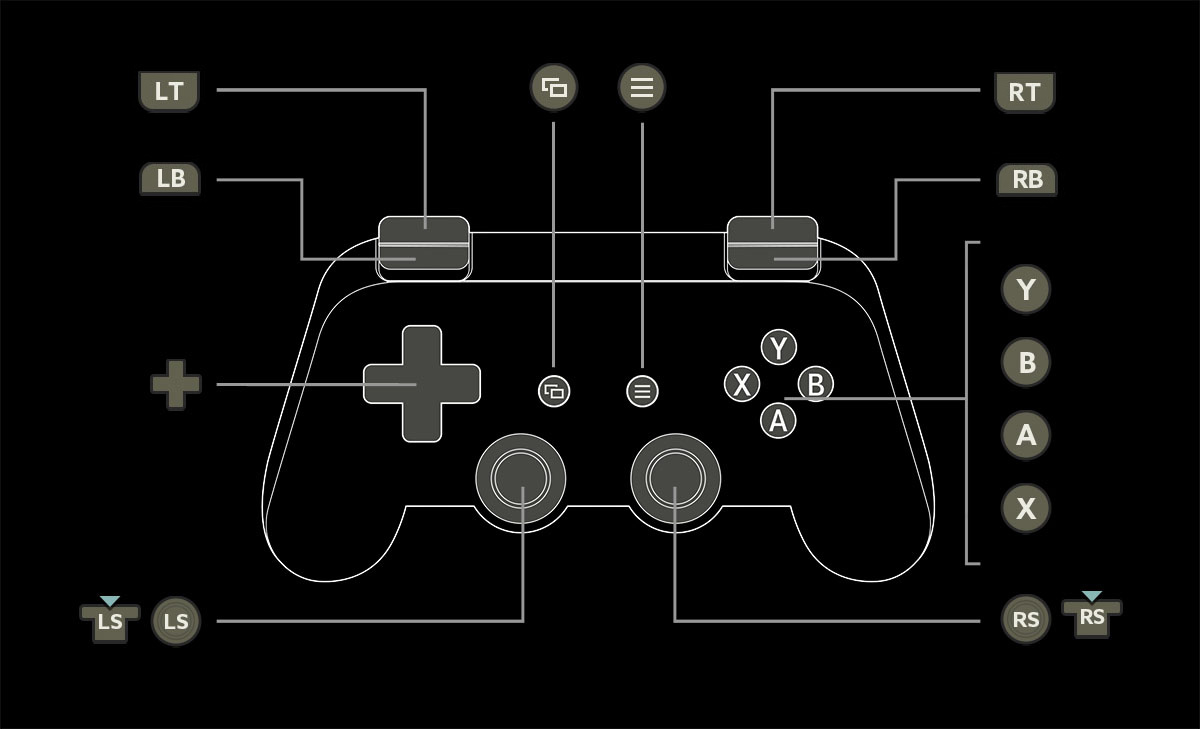
 |
Move |
|---|---|
 |
Dash |
 |
Jump |
| while jumping |
Aerial Skill (Perform a second jump in midair or by springboarding off an enemy.) |
 |
Interact/Talk/Open/Rest |
 |
Guard |
 in quick succession in quick succession |
Dodge |
 |
Camera Controls |
 |
Lock-on/Reset Camera (hold) |
 |
Normal Attacks |
 |
Spirit Attack/Fatal Strike (On enemies who are in Spirit Disruption or unaware of your presence.) |
 +// +// |
Martial Arts 1/Martial Arts 2/Martial Arts 3 |
while holding  |
Switch Martial Arts Set |
| / + |
Deflect (Just before an enemy attack would hit.) |
| + |
Deflect Counterattack |
| +/// |
Wizardry Spells (Activates the Wizardry Spell set to the corresponding button.) |
| while holding |
Switch Wizardry Spells |
| + |
Summon Divine Beast |
| + |
Divine Beast Resonation |
+ |
Switch Melee Weapon |
+ |
Switch Ranged Weapon |
| while holding |
Aim Ranged Weapon |
| while holding |
Shoot Ranged Weapon |
| while holding |
Aim Mode Zoom |
 |
Use Item |
|
Switch Item |
| + |
Encourage |
 |
Open Character Menu |
 |
Open Gesture Menu |
Mouse/Keyboard Controls
| WSAD | Move (Hold Alt key simultaneously to walk.) |
|---|---|
| Shift | Dash |
| Spacebar | Jump |
| Spacebar (while jumping) | Aerial Skill (Perform a second jump in midair or by springboarding off an enemy.) |
| E | Interact/Talk/Open/Rest |
| Right Click | Guard |
| I/K/J/L or Mouse | Camera Controls |
| Middle Click | Lock-on/Reset Camera (hold) |
| Left Click | Normal Attacks |
| Shift + Left Click | Spirit Attack/Fatal Strike (On enemies who are in Spirit Disruption or unaware of your presence.) |
| C/V/Shift+C | Martial Arts 1/Martial Arts 2/Martial Arts 3 |
| Shift+V | Switch Martial Arts Set |
| Tab/F/B | Dodge (Press twice in quick succession.) Deflect (Just before an enemy attack would hit.) |
| T | Deflect Counterattack |
| 1/2/3/4 | Wizardry Spells (Activates the Wizardry Spells set to 1-4.) |
| 5 | Switch Wizardry Spells |
| Z | Summon Divine Beast |
| X | Divine Beast Resonation |
| Wheel Up/Down | Switch Melee Weapon |
| Shift + 3/4 | Switch Ranged Weapon |
| Ctrl + Mouse | Aim Ranged Weapon |
| Left Click/Enter | Shoot Ranged Weapon |
| Ctrl + Wheel Up | Aim Mode Zoom |
| Q | Use Item |
| Shift + 1/2 | Switch Item |
| Y/H | Encourage (Encourages the companion corresponding to the Y/H key.) |
| Esc | Open Character Menu |
| G | Open Gesture Menu |
| P | Start Photo Mode |